AI subtitles and translation — SolusTV V2

01 — it costs nothing

SolusTV AI is free, and needs no key

Translation is normally the line on your bill that grows with your library. Ours doesn't exist. The panel ships with SolusTV's own AI — free API, free token usage, no account to open and no key to paste in. You point it at a film and it works, from the first day.

free api free tokens no key required
See what's included →
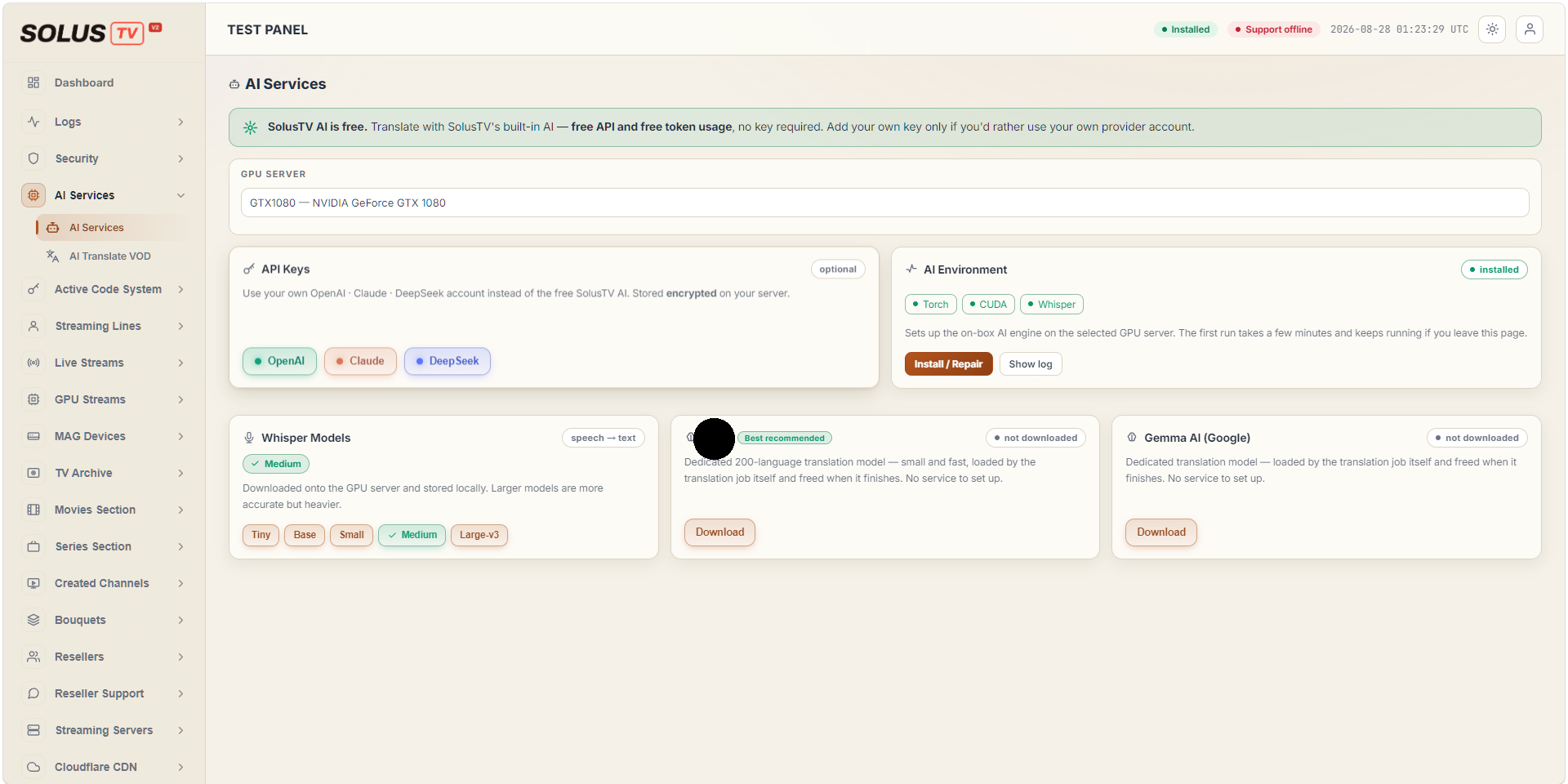
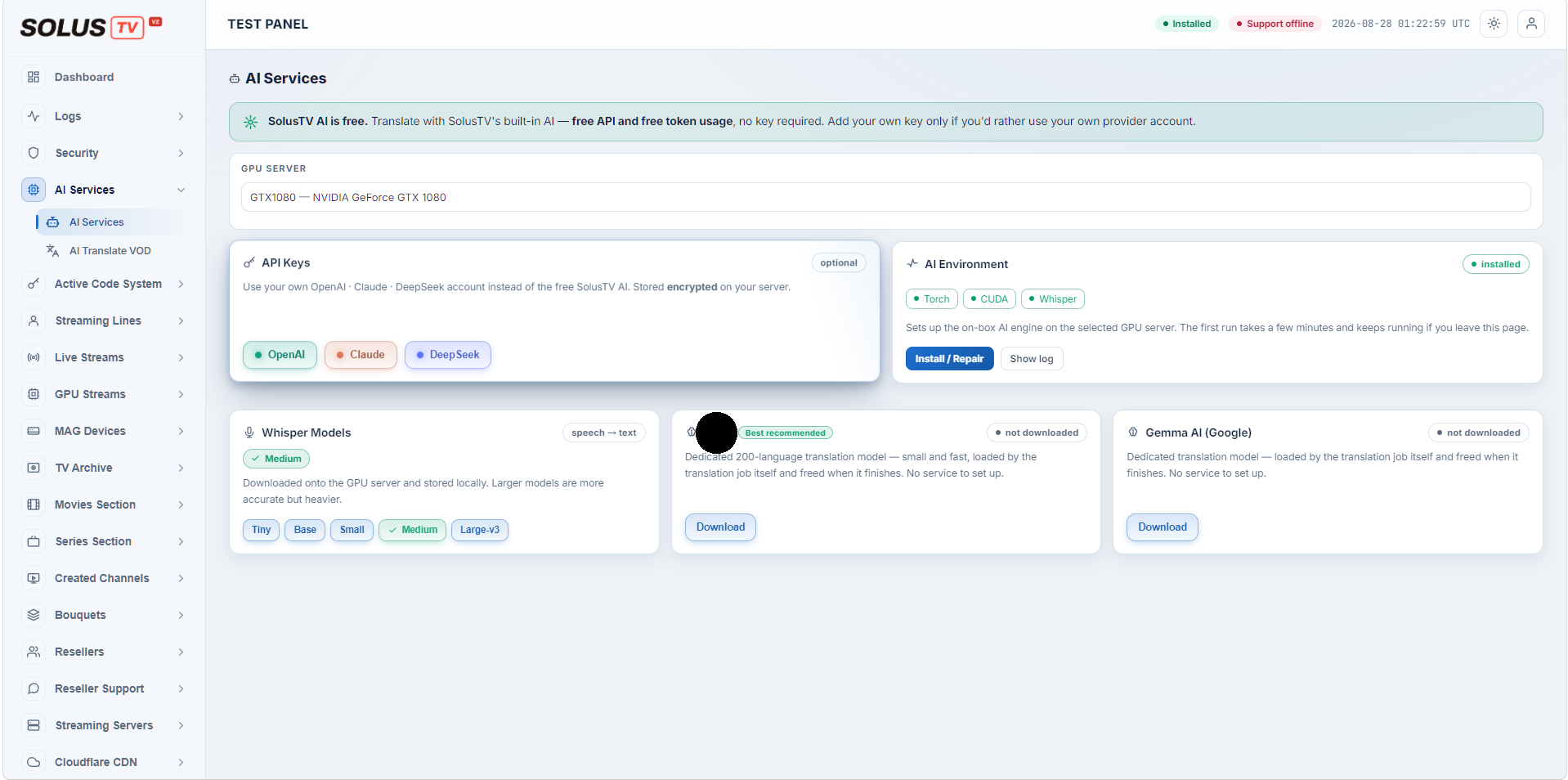
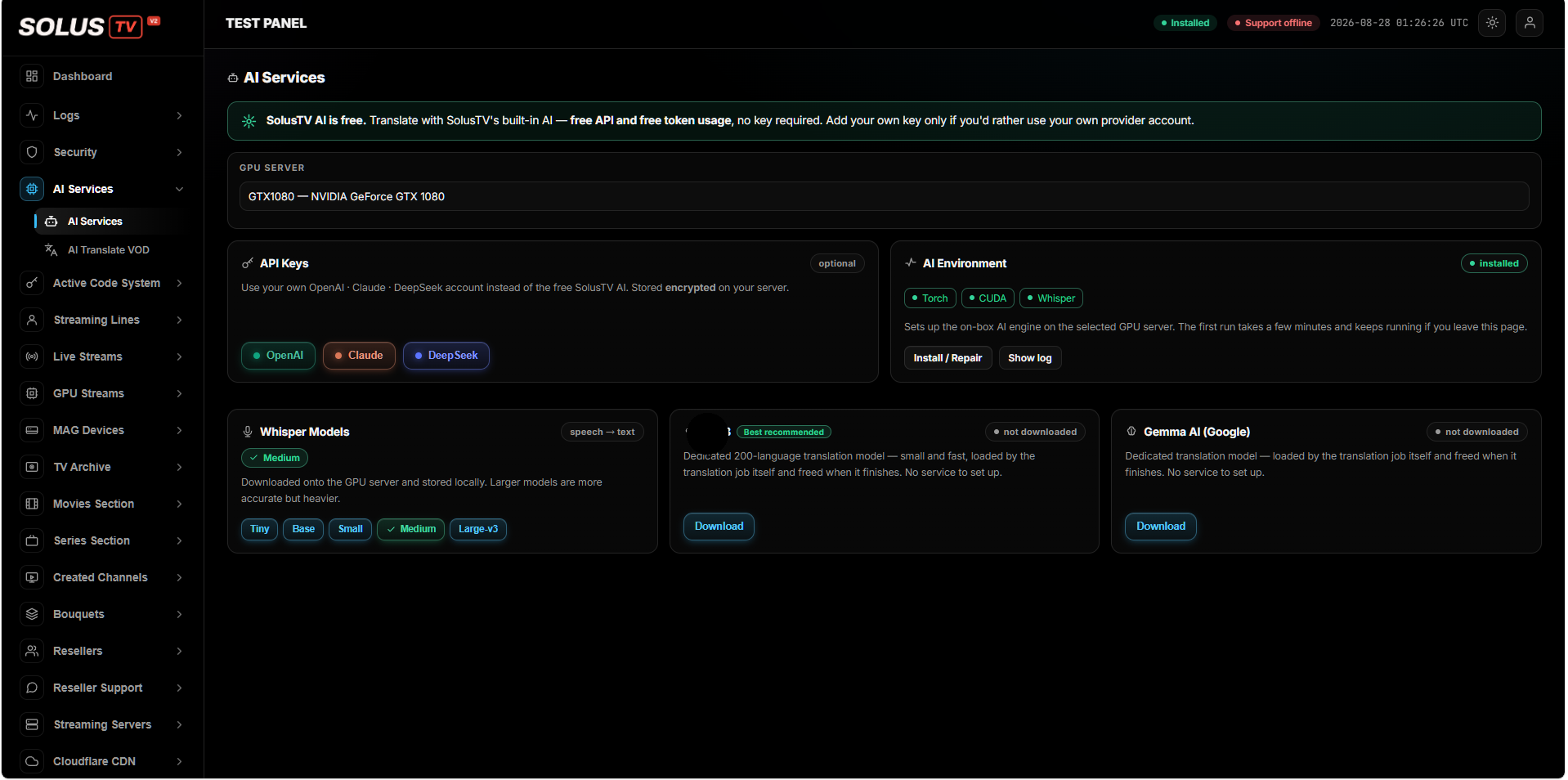
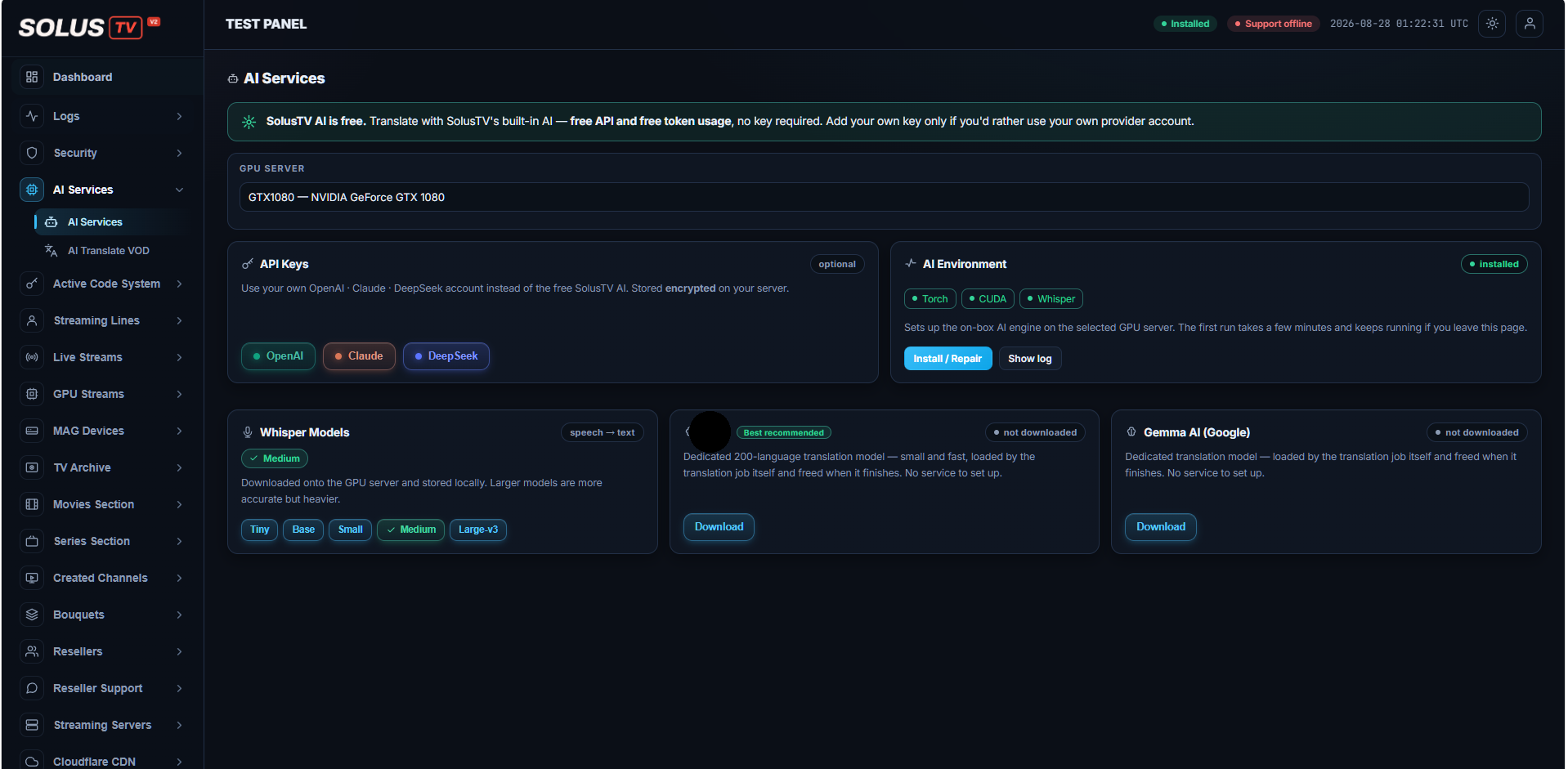
The AI Services screen: the built-in SolusTV AI banner, GPU server, API keys and models
AI Services free built-in AI, no keyclick to enlarge

02 — your choice

Three ways to run it, and you pick

Use the built-in SolusTV AI and pay nothing. Or bring your own OpenAI, Claude or DeepSeek account if you already have one — the key is stored encrypted on your own server. Or run a model locally on your GPU, installed for you. Most panels give you none of these. You get all three.

solustv ai your own key your own model
Compare the three →
The API Keys card: bring your own OpenAI, Claude or DeepSeek account, stored encrypted
API keys optional, stored encryptedclick to enlarge

03 — installation

The AI engine installs itself

Torch, CUDA and Whisper are the part that turns a weekend into a week if you do it by hand. SolusTV sets the whole environment up on the GPU server you choose, with one button and a live log. You never touch a Python environment, and you never become the person who maintains one.

torch cuda whisper one button
How setup works →
The AI Environment card showing Torch, CUDA and Whisper installed, with install and log buttons
AI environment torch · cuda · whisperclick to enlarge

04 — subtitles

Written from the film's own audio

No subtitle file to find, no transcription to commission. The platform listens to the film and produces subtitles timed to it. Five model sizes let you decide the trade: a fast one to clear a back catalogue, a heavier one for the titles you actually promote.

tiny base small medium large-v3
See the model sizes →
The Whisper Models card with the five model sizes, and the translation model downloads
Whisper models tiny → large-v3click to enlarge

05 — translation

Two hundred languages, source detected for you

You don't tell it what language the film is in — it works that out and translates into the one you asked for. A dedicated 200-language model handles it, so a title that only ever served one market can serve every market you sell to.

200 languages source auto-detected gemma ai available
See the models →
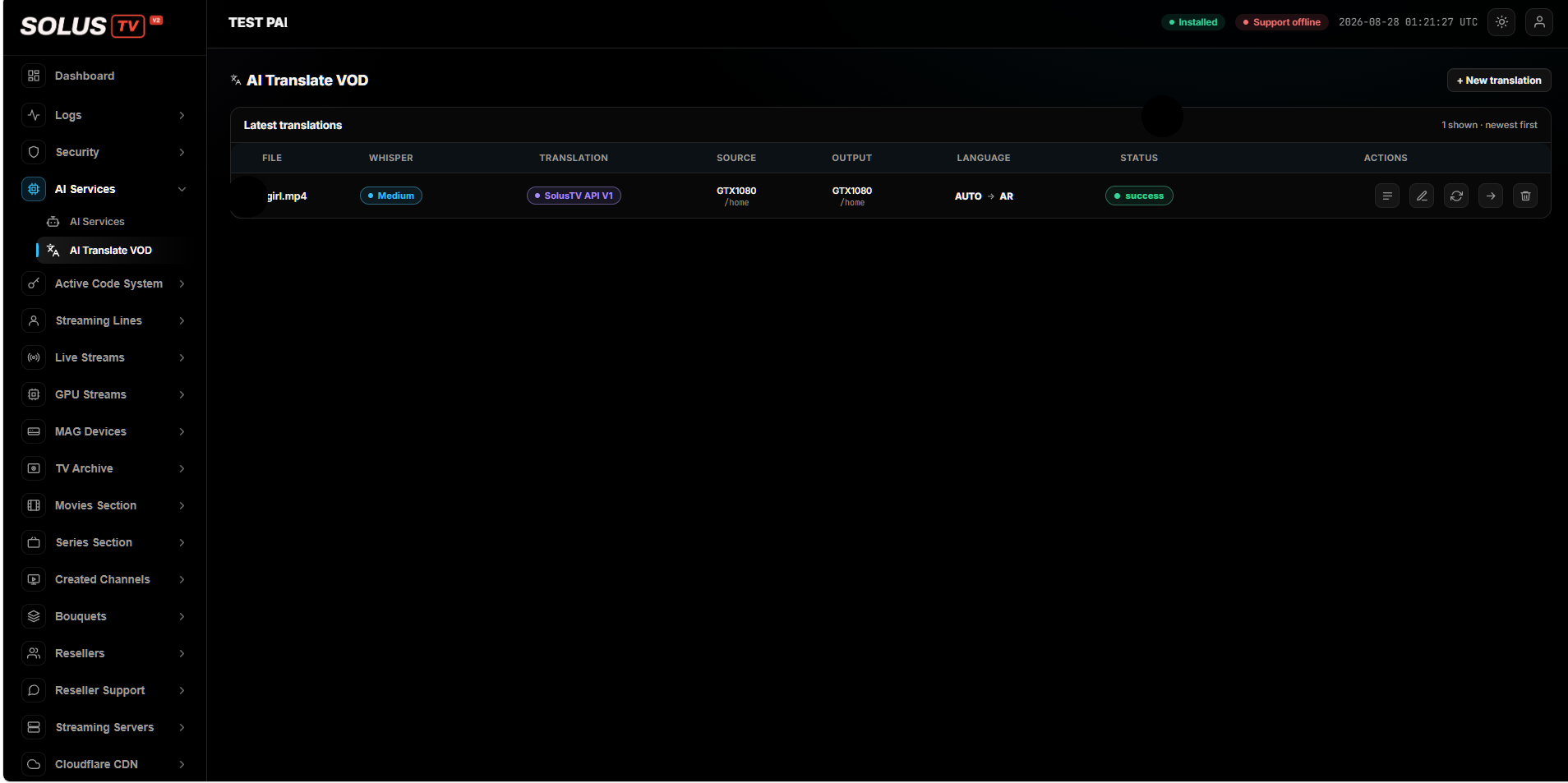
The AI Translate VOD list: one job with its speech model, engine, source, output, languages and status
AI Translate VOD auto → ar · successclick to enlarge

06 — nothing left running

Models load for the job, then free the card

The translation models are loaded by the job that needs them and released the moment it finishes. There is no permanent AI service sitting on your GPU eating memory between films — which is exactly why AI here doesn't cost you encoding capacity.

no service to set up memory freed gpu stays available
The GPU page →
// during a job
model  loaded
vram   in use

// after it finishes
model  freed
vram   back for encoding

07 — on any device

Burned into the picture, so nothing can ignore it

A subtitle track only helps when the customer's player supports it, and plenty quietly don't. SolusTV can write the subtitles into the video itself, so they appear on every player, every set-top box and every phone — and none of your content leaves your hardware to get there.

burned in any player your hardware only
Start the 3-day trial →
// subtitle track
works if  the player supports it

// burned in
works on  everything
content   never leaves your server
01 / 07
Three ways to run it

Free by default. Yours if you'd rather.

Most platforms decide this for you and bill you for the privilege. SolusTV gives you three routes to the same result and lets you switch between them whenever you like.

recommended · free

SolusTV AI

The built-in engine. Free API, free token usage, no key and no account. It is on the moment you install the panel, and it is what most owners never need to change.

freenothing to set up
optional

Your own provider key

Already have an OpenAI, Claude or DeepSeek account and want the work billed there? Paste the key in. It is stored encrypted on your own server, and you can remove it at any time.

openaiclaudedeepseekencrypted
fully local

Your own model

Run the models on your own GPU instead, downloaded and installed for you. Nothing leaves the building and nothing is billed per minute — the only limit is what your hardware can work through.

auto installedon your gpuoffline
Setting it up

One button, and the environment is built

Getting Torch, CUDA and Whisper working together on a GPU box is the reason most operators never ship AI features at all. SolusTV does that part for you, on whichever GPU server you select, with a log you can watch while it runs.

  • Pick the GPU server you want the AI to run on.
  • Press install — Torch, CUDA and Whisper are set up on that box.
  • Watch the log if you want to; the first run takes a few minutes and carries on if you navigate away.
  • Repair with the same button if anything ever needs rebuilding.
AI environment installed
torch cuda whisper

Set up on the GPU server you choose. The first run takes a few minutes and keeps going if you leave the page.

API keys optional

Only if you want your own provider account used instead of the free SolusTV AI. Stored encrypted on your server.

Models

You choose how accurate, and how heavy

Speech models turn the audio into text; translation models turn that text into the language you need. Both are downloaded onto your GPU server and stored there.

Speech models — audio to text

  • Five sizes: Tiny, Base, Small, Medium and Large-v3
  • Larger is more accurate but heavier — you decide the trade per job
  • Downloaded onto the GPU server and stored locally
  • A fast size for a back catalogue, a heavy one for the titles you promote

Translation models — text to any language

  • A dedicated 200-language model, small and fast
  • Gemma AI (Google) available as an alternative
  • Loaded by the job that needs it, then freed when it finishes
  • No service to set up and nothing left running on your card
Running the work

Every translation, with its state on the screen

Translation is a queue, not a mystery. Each job shows the file, the speech model, the engine that translated it, where the source and output live, the languages and whether it succeeded.

  • Source language detected automatically — you only choose the target.
  • Per-job status, so a failure is visible rather than silent.
  • Re-run, edit or remove a job from the same list.
  • Newest first, so what you started last is what you see first.

Start the 3-day trial

Translation job success
fileread
speechdone
translatedone
AUTO → AR whisper medium solustv api
Questions

What owners ask about it

Is the AI really free?
Yes. SolusTV's built-in AI comes with free API access and free token usage, and needs no key and no account. Adding your own provider key is optional, and only worth doing if you specifically want the work billed to an account you already have.
Do I need subtitle files to start?
No. Subtitles are produced from the film's own audio, so a title with nothing attached to it is a perfectly normal starting point.
Which speech model should I use?
There are five, from Tiny to Large-v3. Larger models are more accurate but heavier. A practical approach is a smaller one to work through a back catalogue quickly and a larger one for the titles you promote.
Do I have to tell it what language the film is in?
No. The source language is detected automatically — you choose the language you want it translated into and the platform handles the rest.
Will AI eat the GPU I need for encoding?
Not between jobs. The translation models are loaded by the job that needs them and freed as soon as it finishes, so there's no permanent AI service holding memory on your card.
Does my content leave my server?
Your files stay on your hardware. If you choose to run a local model, the entire process — speech and translation — happens on your own GPU server and nothing is sent anywhere.
What's the difference between subtitle tracks and burning them in?
A track is something the viewer's player has to support, and plenty quietly don't. Burned-in subtitles are part of the picture, so they show up on any player and any device. Burning in is the safer choice when you don't control what your customers watch on.
Try it on one of your own films

The honest test is a title from your library, in the language your market speaks — not a demo clip. Three days on your own server is enough to know.