Security and firewall — SolusTV V2

01 — two firewalls

One refuses the request. One refuses the address.

The Panel Firewall judges each request against rules you write. The Kernel Firewall works a level lower: it refuses an address in the kernel, before it costs your server a connection at all — every port, for everyone behind it. Together they stop the traffic you don't want at the cheapest point it can be stopped.

panel firewall kernel firewall firewall log
How the two differ →
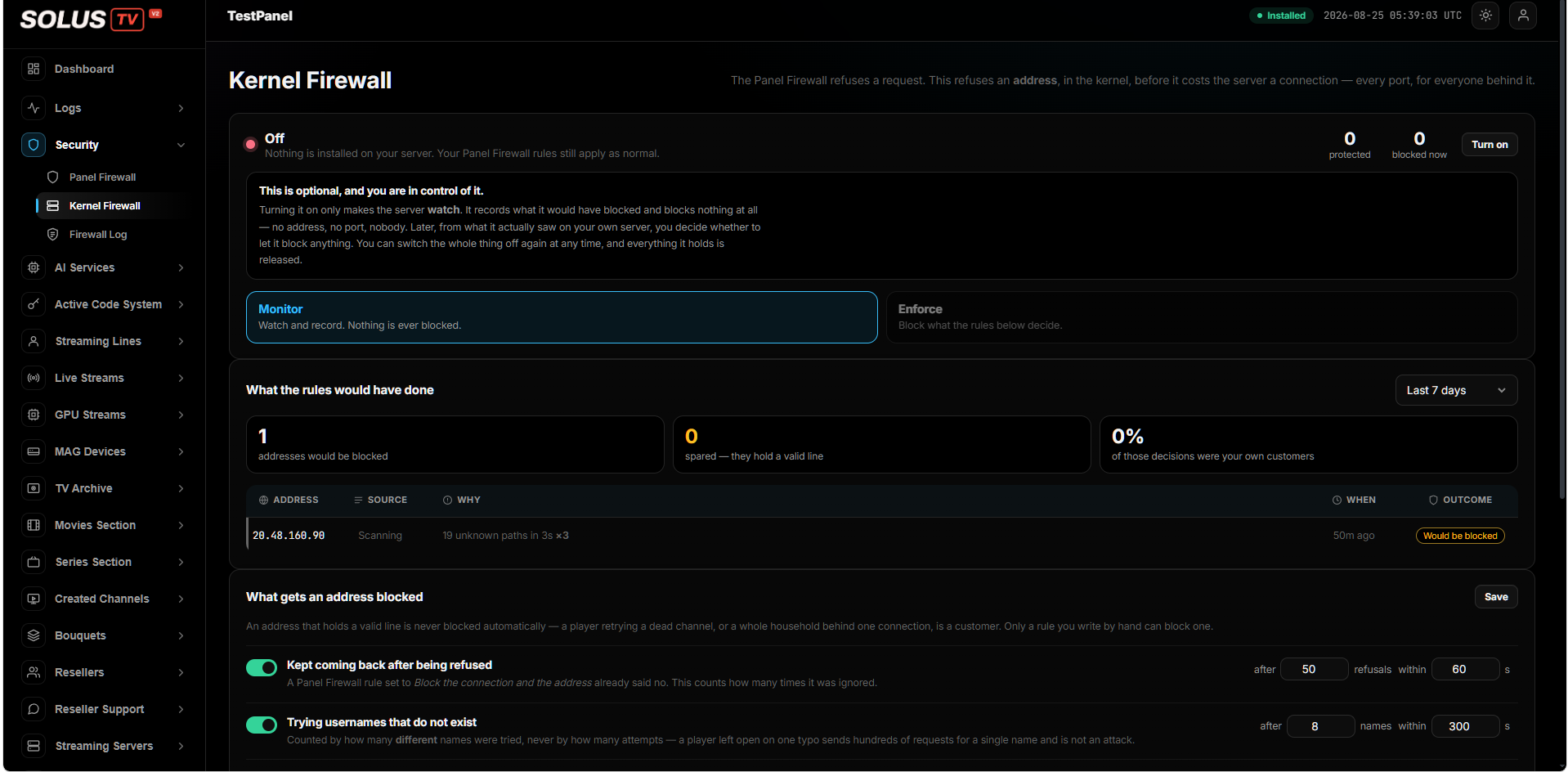
The Kernel Firewall screen in monitor mode, showing what the rules would have done and what gets an address blocked
Kernel firewall monitor mode, with its evidenceclick to enlarge

02 — what a rule can see

Far more than a country and an IP

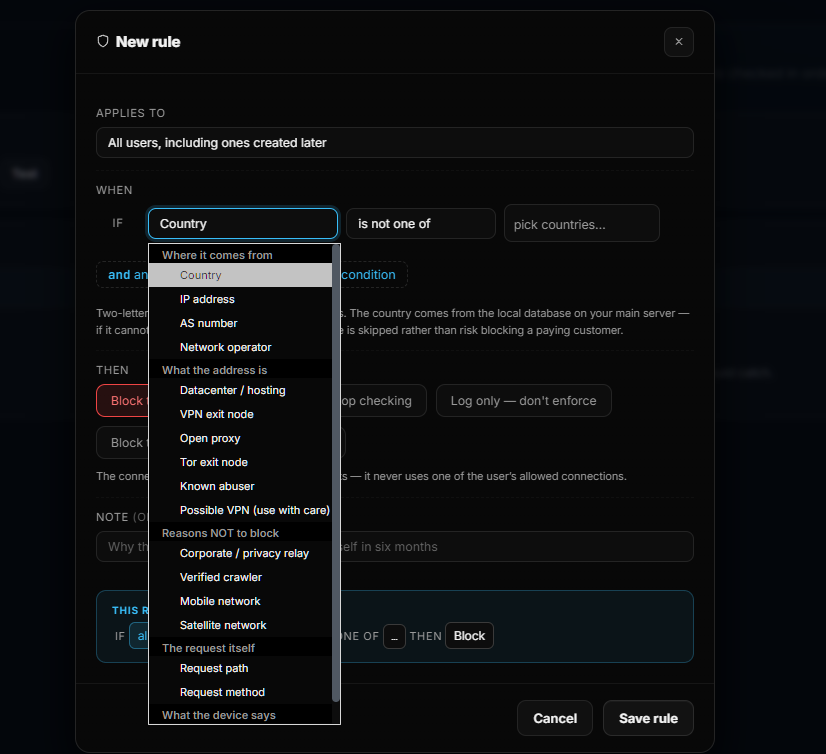
Write a rule against where a connection comes from — country, address, AS number, network operator — or against what that address is: a datacentre, a VPN exit node, an open proxy, a Tor exit, a known abuser. And because blocking too much costs more than blocking too little, there are signals for what to leave alone: corporate privacy relays, verified crawlers, mobile and satellite networks.

as number network operator vpn · proxy · tor datacenter known abuser
The full list →
The new rule dialog showing conditions: country, IP address, AS number, network operator, datacenter, VPN exit node, open proxy, Tor exit node, known abuser, and reasons not to block
Rule conditions origin, address type, exceptionsclick to enlarge

03 — who it applies to

A rule can target exactly one kind of account

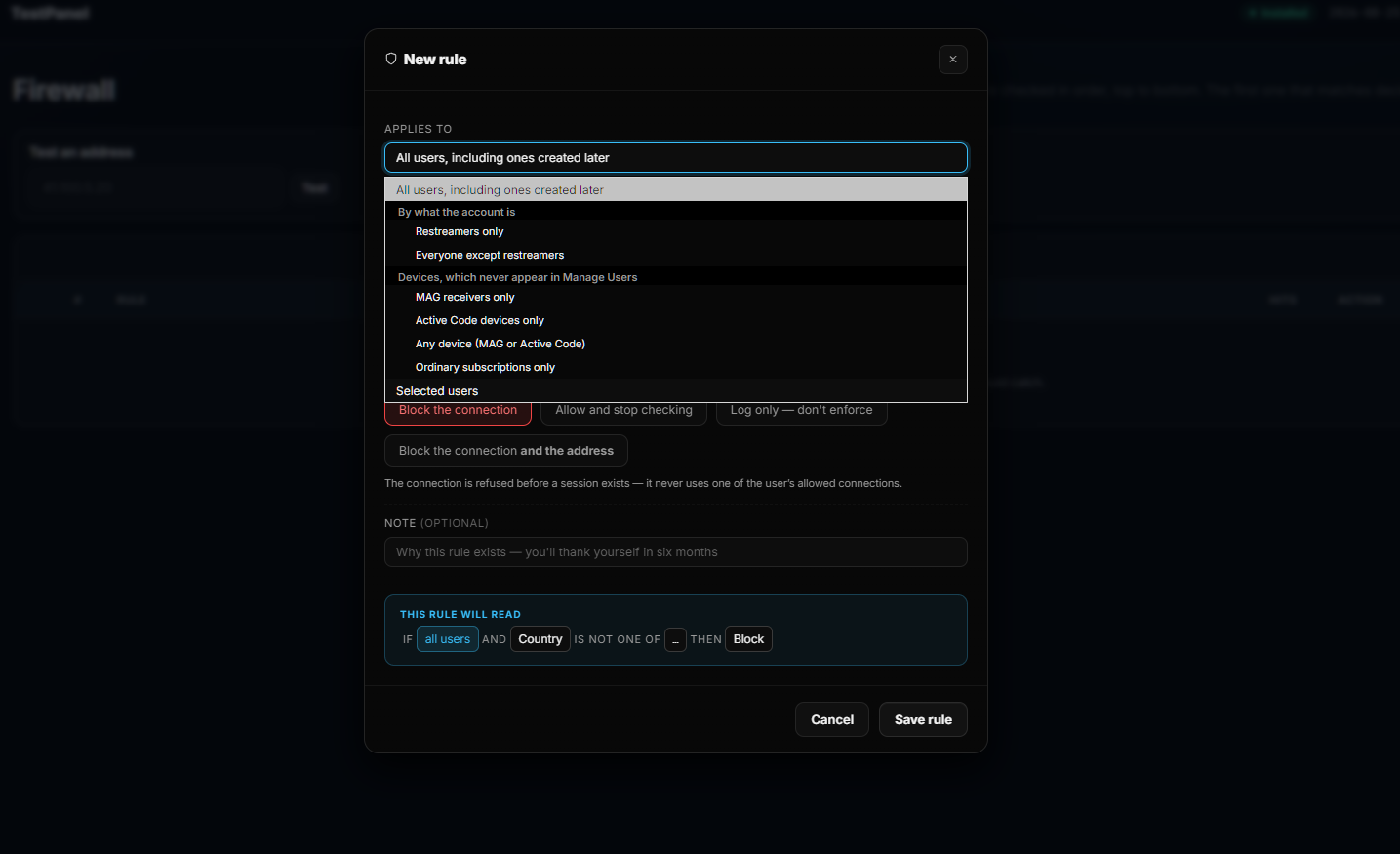
Point a rule at everyone, at restreamers only, at everyone except restreamers, at MAG receivers, at Active Code devices, at ordinary subscriptions, or at users you name. Then choose what happens: refuse the connection, refuse the connection and the address, allow and stop checking, or log it and enforce nothing.

restreamers mag receivers active code devices selected users
Targets and actions →
The rule dialog showing who a rule applies to: restreamers, MAG receivers, Active Code devices, ordinary subscriptions or selected users, with the plain-English rule preview
Targets and actions with a plain-English previewclick to enlarge

04 — nothing blocks blind

It watches first, and blocks only when you say so

Switch the kernel firewall on and it does not block anything. It watches, and records what it would have blocked, on your own server with your own traffic. Days later you look at the evidence — including how many of those decisions would have hit your own customers — and only then decide to enforce. Switch it off and everything it holds is released.

monitor mode real evidence enforce when ready reversible
How that works →
// turn it on
mode     monitor — blocks nothing

// after a few days, you see
would block  addresses, with the reason
spared       they hold a valid line
customers    how many would have been hit

// then, only if you want
mode     enforce

05 — customers come first

Built so security never costs you a paying customer

Every judgement in this system leans the same way. An address holding a valid line is never blocked automatically. A refused connection never uses up one of a user's allowed connections. If a country can't be determined, the rule is skipped rather than risk refusing somebody who pays you. And a player left retrying on one typo is counted as one name, not a thousand attacks.

valid lines protected no connection consumed fails open
Why that matters →
// the bias, everywhere
valid line    never auto-blocked
refused      costs the user no connection
unknown      rule skipped, not enforced
one typo     counted once, not per attempt

blocking too much costs more than too little

06 — beyond the firewall

Your team, your account, your record

Two-step sign-in on the owner's account. Staff accounts that reach only their part of the system, so support doesn't touch billing or servers. A full audit of who did what. Protection against account sharing and viewing patterns that don't look like a household. And all of it on hardware you own.

two-step sign-in staff permissions full audit anti-sharing
See the rest →
// the account
owner   two-step sign-in
staff    only their part of the system
actions recorded, all of them

// the service
sharing detected
data    on your own servers
01 / 06
Two layers

Stop it at the cheapest point it can be stopped

Refusing a request costs your server something. Refusing an address costs it almost nothing. SolusTV gives you both, and a log that tells you what each one did.

layer one

Panel firewall

Judges each request against the rules you write. This is where the detail lives — origin, network, address reputation, who the account is, what the request asks for.

layer two

Kernel firewall

Refuses an address in the kernel, before it costs the server a connection — across every port, for everyone behind it. Optional, and off until you decide otherwise.

the record

Firewall log

Every decision with the address, where it came from, why it was judged that way, when, and what happened. Security you can audit rather than trust.

What a rule can see

A country and an IP is where most panels stop

A rule is built from conditions, combined however you need them. These are the signals available to it — including, deliberately, the ones that tell you when not to block.

Where it comes from

  • Country — one, or a list
  • IP address — single addresses or ranges
  • AS number — the network it belongs to
  • Network operator — the ISP or carrier behind it

What the address is

  • Datacentre or hosting — traffic from a server, not a home
  • VPN exit node, and separately possible VPN
  • Open proxy and Tor exit node
  • Known abuser

Reasons not to block

  • Corporate or privacy relay — a normal customer behind a company network
  • Verified crawler
  • Mobile network — where addresses shift constantly
  • Satellite network

The request and the device

  • Request path — what is actually being asked for
  • Request method
  • What the device says about itself
  • Conditions combined, so a rule can be as narrow as you need
Who, and what happens

Aim a rule at one kind of account, not all of them

Restreamers and set-top boxes don't behave like ordinary subscriptions, so a rule that suits one will be wrong for another. Every rule chooses its own audience before it chooses its condition.

  • Everyone, including accounts created later
  • Restreamers only — or everyone except them
  • MAG receivers, Active Code devices, or any device
  • Ordinary subscriptions only, or users you name

Then the action: refuse the connection, refuse the connection and the address, allow and stop checking, or log it and enforce nothing at all.

This rule will read plain english

IF all users AND Country IS NOT ONE OF … THEN Block

Every rule is written back to you as a sentence before you save it, so you can see what it will actually do rather than what you meant it to do.

Test an address before enforcing

Put a real address in and see how your rules would judge it — before anybody's connection depends on the answer. Rules can carry a note, too, for the version of you reading them in six months.

Monitor first

Evidence from your own server, before anything is refused

The usual way to deploy a firewall is to turn it on and find out what broke. This one starts by proving itself against your real traffic.

01 Turn it on

Nothing is blocked. The server watches and records what it would have done.

02 Let it watch

It builds a picture from your own traffic, not from somebody else's assumptions.

03 Read the evidence

What would have been blocked, why, what was spared for holding a valid line — and what share of it was your own customers.

04 Decide

Enforce it, adjust it, or switch the whole thing off — everything it holds is released.

The bias

Blocking a customer costs more than missing an attacker

Any firewall can be strict. The hard part is being strict without generating support tickets from people who pay you. Every default here leans towards the customer.

  • An address holding a valid line is never blocked automatically. A player retrying a dead channel, or a household behind one connection, is a customer — only a rule you write by hand can block one.
  • A refused connection never uses one of a user's allowed connections. It's turned away before a session exists, so being attacked doesn't lock out the person paying.
  • If a country can't be determined, the rule is skipped rather than enforced — the platform would rather miss one than refuse somebody who pays you.
  • Repeated attempts are counted by distinct usernames, not by volume. A player left running on a single typo sends hundreds of requests for one name; that is a mistake, not an attack, and it's treated as one.
  • You set the thresholds — how many, and over what window — so the sensitivity fits your traffic rather than a default someone else chose.
What the rules would have done monitor
addresses that would be blocked spared — they hold a valid line share that were your customers

Each entry carries the address, where it came from, why it was judged that way, when it happened and what the outcome would have been.

Beyond the firewall

Most incidents inside a business aren't attacks

They're somebody reaching something they were never meant to reach. Staff accounts and the audit trail make that both unlikely and answerable.

Staff accounts

  • Each person gets their own account, not a shared login
  • Precise permissions — access to a part of the system, not all of it
  • Someone in support doesn't reach billing, servers or content
  • Access changed or withdrawn when a role changes

Audit

  • A full record of who did what inside the panel
  • Answers "when did this change, and who changed it" without guesswork
  • Useful for ordinary mistakes, not only for suspicion
  • Kept on your own servers, like everything else

Getting into the panel

  • Two-step sign-in for the owner's account
  • A stolen password on its own isn't enough
  • Staff actions appear in the audit like anyone else's

Account protection

  • Protection against account sharing
  • Detection of unusual viewing patterns
  • Suspend, resume or cancel instantly
  • Activation records showing which devices were set up
The foundation

Your servers, your data

Before any particular feature, there's the arrangement itself. SolusTV runs on hardware you own or rent. Your channels, your library, your customer list, your resellers and your logs all live on your own machines.

Nothing about your business sits with anyone else — which is the part no security feature can give you afterwards if the arrangement is wrong to begin with.

Start the 3-day trial

// what lives on your hardware
channels · films · customers
resellers · billing limits
firewall rules · logs · audit

// what lives with us
nothing
Questions

What owners ask about it

Can I block VPNs and proxies, not just countries?
Yes. A rule can act on what an address is — a datacentre or hosting address, a VPN exit node, an open proxy, a Tor exit node or a known abuser — as well as where it comes from, including the AS number and the network operator behind it.
Won't blocking VPNs catch real customers?
That's exactly why there are signals for what not to block: corporate and privacy relays, verified crawlers, mobile networks and satellite networks. "Possible VPN" is offered separately from a confirmed VPN exit node, so you can be aggressive where you're certain and cautious where you aren't.
What stops a firewall rule taking my own customers offline?
Several things, deliberately. An address holding a valid line is never blocked automatically. A refused connection is turned away before a session exists, so it never consumes one of the user's allowed connections. If a country can't be determined the rule is skipped rather than enforced. And you can test a real address against your rules before anything depends on the answer.
Do I have to turn the kernel firewall on?
No. It's optional and off by default. When you do turn it on it starts in monitor mode, where it blocks nothing and simply records what it would have done — including how much of that would have been your own customers. You enforce only when the evidence from your own server says you should, and switching it off releases everything it holds.
Can a rule apply to only some accounts?
Yes. Rules can target everyone, restreamers only, everyone except restreamers, MAG receivers, Active Code devices, any device, ordinary subscriptions only, or specific users you name.
How do I know what a rule will actually do?
Every rule is written back to you as a plain sentence before you save it, and you can test a real address against your rules. Rules can also carry a note explaining why they exist — which matters more than it sounds when you revisit them months later.
Will you tell me the exact detection thresholds?
The thresholds are yours to set — how many events, over what window — so they fit your traffic. We don't publish the defaults here, because a public page is read by everyone, including the people you're being protected from. Ask us directly and we'll go through it.
Watch it against your own traffic

Turn the firewall on in monitor mode, leave it for a few days, and read what it found on your server. That's a more useful answer than anything on this page.