SolusTV V2 features — the complete IPTV platform

01 — control panel

Everything on one screen, in plain language

The panel opens on what is happening right now — active viewers, running channels, server load. Not a menu you have to learn before it tells you anything. Light, dark and high-contrast themes, and it works on a phone as well as a desktop.

live dashboard four themes works on mobile
See the panel →
// first screen you see
viewers  live count
channels what is running
servers  load, at a glance

// interface
themes   light · dark · black · mint

02 — servers

Unlimited servers, installed for you

Start on one machine and add more as the audience grows. The platform installs and configures each new server itself, viewers are directed to the right one automatically, and a built-in speed test makes a slow or mis-sold server obvious immediately rather than three months in.

automatic setup live health speed test no downtime
See servers →
// adding a server
install  automatic
routing  viewers sent to the right node

// per server, live
cpu · ram · disk · network · viewers

03 — live channels

Thousands of channels, running only when watched

Channels, categories and sources in one place, with quality, behaviour and failover set per channel. On-demand channels start the moment somebody watches and stop when nobody does — which is what makes a large line-up cost a fraction of running everything continuously.

on demand 800 ms to live failover mass editing
See channels →
// always running
cost  the whole line-up, all day

// on demand
start first viewer · 800 ms
stop  last viewer leaves
cost  what is being watched

04 — films and series

A library that fills itself

Films, series, seasons and episodes with categories, artwork and metadata, organised into the packages you decide. Point the platform at a folder or a link and new content is picked up and published on its own, instead of being added by hand every time.

folder & link watch batch encoding artwork
See the library →
// you point it at
folder  watched
link    watched

// it handles
import · artwork · encoding · packages

05 — ai subtitles

Your library, in your audience's language

Subtitles generated from a film's own audio, translated into the languages your market speaks, and optionally burned into the picture so they work on any device. The models install and configure themselves on your server, and nothing leaves your hardware.

unlimited tokens burned in auto installed your hardware
The AI page →
// one film
audio   original language

// after
subs    generated · translated
burn    optional, any device
reach   every language you add

06 — customers and devices

Who watches what, on how many screens

Packages per customer, device limits, expiry dates, trials and renewals — suspend, resume or cancel instantly. Getting a customer watching is a short active code rather than a server address and password read out over the phone, and every activation is on the record.

active codes mag devices device limits country rules
The codes page →
// setting a customer up
before address · username · password
now    one short code

// on the account
packages · devices · expiry · record

07 — resellers

Partners, inside limits you set

Resellers manage their own customers and can build sub-resellers underneath them. Credits are bought before they are spent so nobody runs up a debt with you, packages define exactly what each partner may sell, and white-label puts their name and domain on it.

credits sub-resellers white-label full history
The resellers page →
// the chain
youresellersub-resellerviewer

// every level bounded by
package  what they may sell
credits  bought, then spent

08 — running it

Monitoring, security and updates

A live view of who is watching and from where, per-channel figures and readable logs — so a failing channel shows up before your inbox does. A built-in firewall, country and network rules, staff permissions and a full audit. One-click updates and automatic daily backups.

live monitoring firewall audit daily backup
The security page →
// you see
watching who, what, from where
channels figures per channel

// handled for you
firewall · backups · updates · audit
01 / 08
Control panel

Everything on one screen, in plain language

The panel opens on what's happening right now — how many people are watching, which channels are running, how hard your servers are working. Not a menu you have to learn before it tells you anything.

dashboard

What's happening now

Active viewers, running channels and server load, on the first screen you see.

themes

Light, dark, high contrast

Choose the interface that suits the room you work in and the eyes you're working with.

mobile

Works on a phone

The panel works on a phone as well as a desktop, so being away from your desk isn't being away from your business.

language

Clear labels throughout

English throughout, in non-technical language — written for the person running the business.

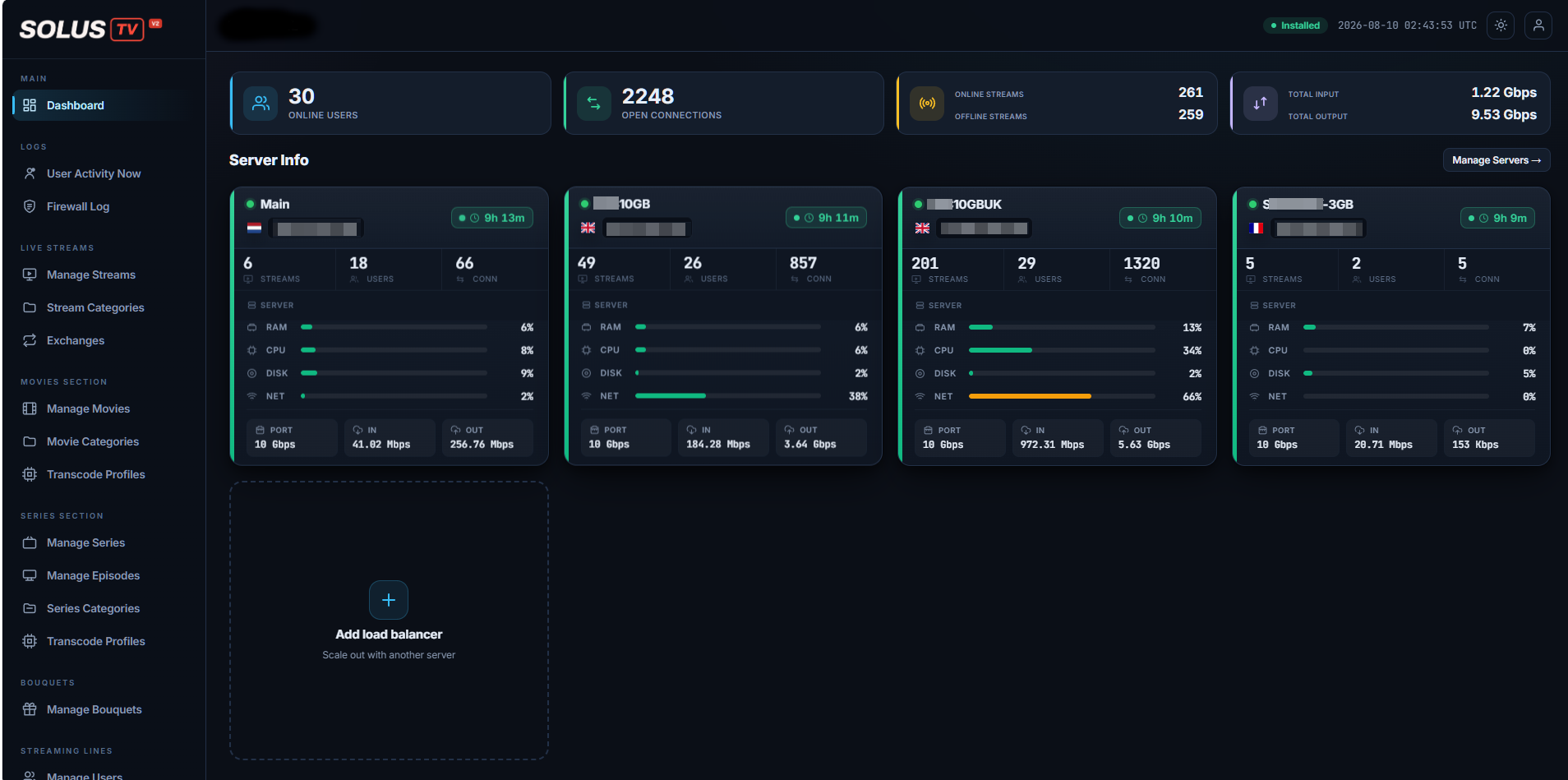
dashboard
The SolusTV dashboard, showing server information, stream counts and throughput
Streaming servers

Add a server in minutes, and see its health at a glance

Start on a single server and add more as the audience grows. The platform installs and configures everything on a new machine itself, so growing doesn't mean rebuilding.

  • Automatic setup — the platform installs and configures a new server for you.
  • Live health per server: processor, memory, disk, network throughput and connected viewers.
  • A built-in speed test, so a slow or mis-sold server is obvious immediately rather than three months in.
  • Viewers are directed automatically to the right server.
  • Add, move or retire a server without interrupting the service.
Streaming server healthy
cpu46%
memory38%
disk61%
network72%
Streaming server busy
cpu83%
memory57%
viewers69%

Illustrative. Live figures come from your own servers.

Live channels

Run thousands of channels, and pay for the ones being watched

The expensive habit in this business is running a whole line-up around the clock so that it's there if somebody wants it. On-demand channels remove that: a channel starts the moment somebody watches it, and stops when nobody does.

On-demand channels

A large line-up, at a fraction of the cost

A channel nobody is watching costs you the same as one everybody is watching — unless it isn't running. On-demand channels start on the first viewer and stop after the last one, which is what makes offering a big line-up sensible rather than expensive.

// always running
channels  all of them, all the time
cost     the whole line-up

// on demand
start    first viewer arrives
stop     last viewer leaves
cost     what's being watched
organisation

Channels, categories, sources

Manage channels, their categories and the sources behind them in one place, rather than three.

sources

Bring in other providers

Bring in sources from other providers and keep them organised alongside your own.

build

Build your own channels

Assemble your own channels from the sources you already have.

per channel

Quality, behaviour, failover

Controls for each channel individually — how it looks, how it behaves, and what happens when a source fails.

presentation

Logos handled for you

Channel logos and presentation are taken care of, so the line-up looks finished without the manual work.

processing

Several qualities at once

Convert a channel into several qualities on graphics hardware — covered properly on the video processing page.

Films and series

A full on-demand library alongside live TV

Live channels bring customers in; a library keeps them. Films, series, seasons and episodes are managed in the same platform, with the artwork and descriptions that make a library worth browsing.

The library

  • Films, series, seasons and episodes, with categories
  • Artwork, descriptions and metadata, so it looks like a catalogue rather than a file list
  • Quality presets for on-demand content
  • Content organised into packages you decide

In the customer's language

  • Subtitles generated from the film's own audio
  • Translated into the languages your market speaks
  • Optionally burned into the picture, so any device shows them
  • All of it on your own hardware — see the AI page
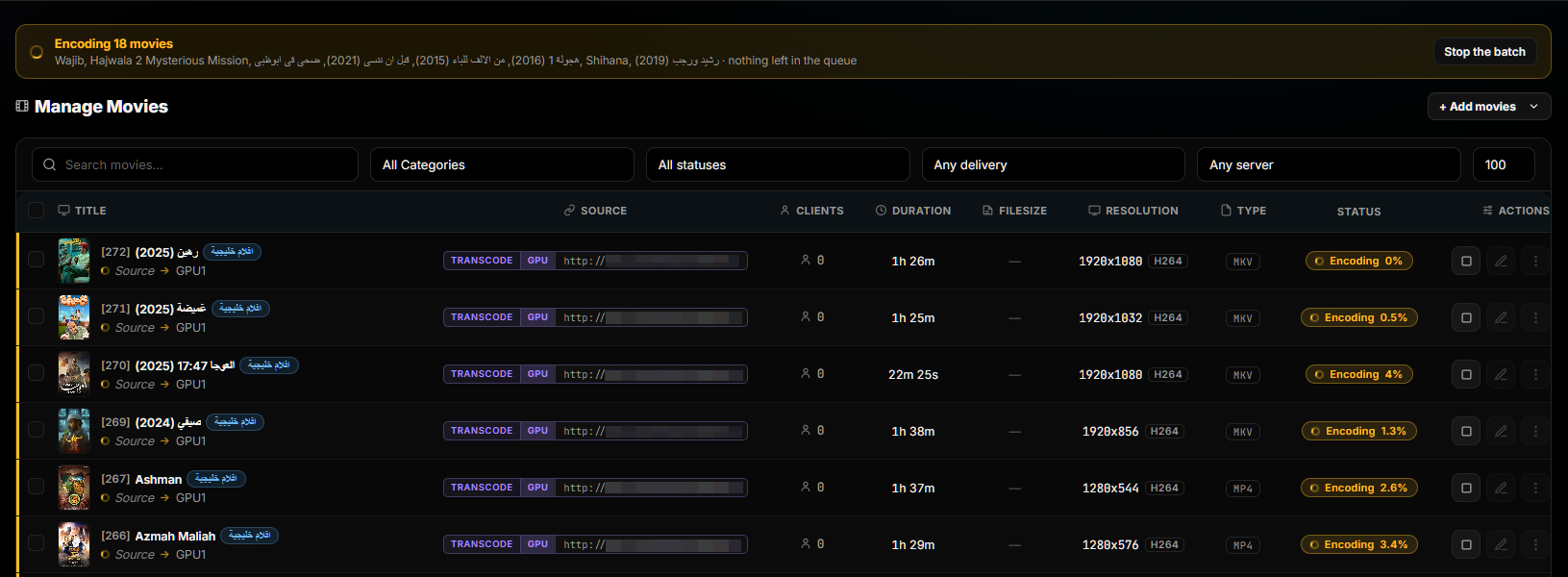
Managing films, with per-title progress across a batch
FilmsManaged in batches, with progress shown per title
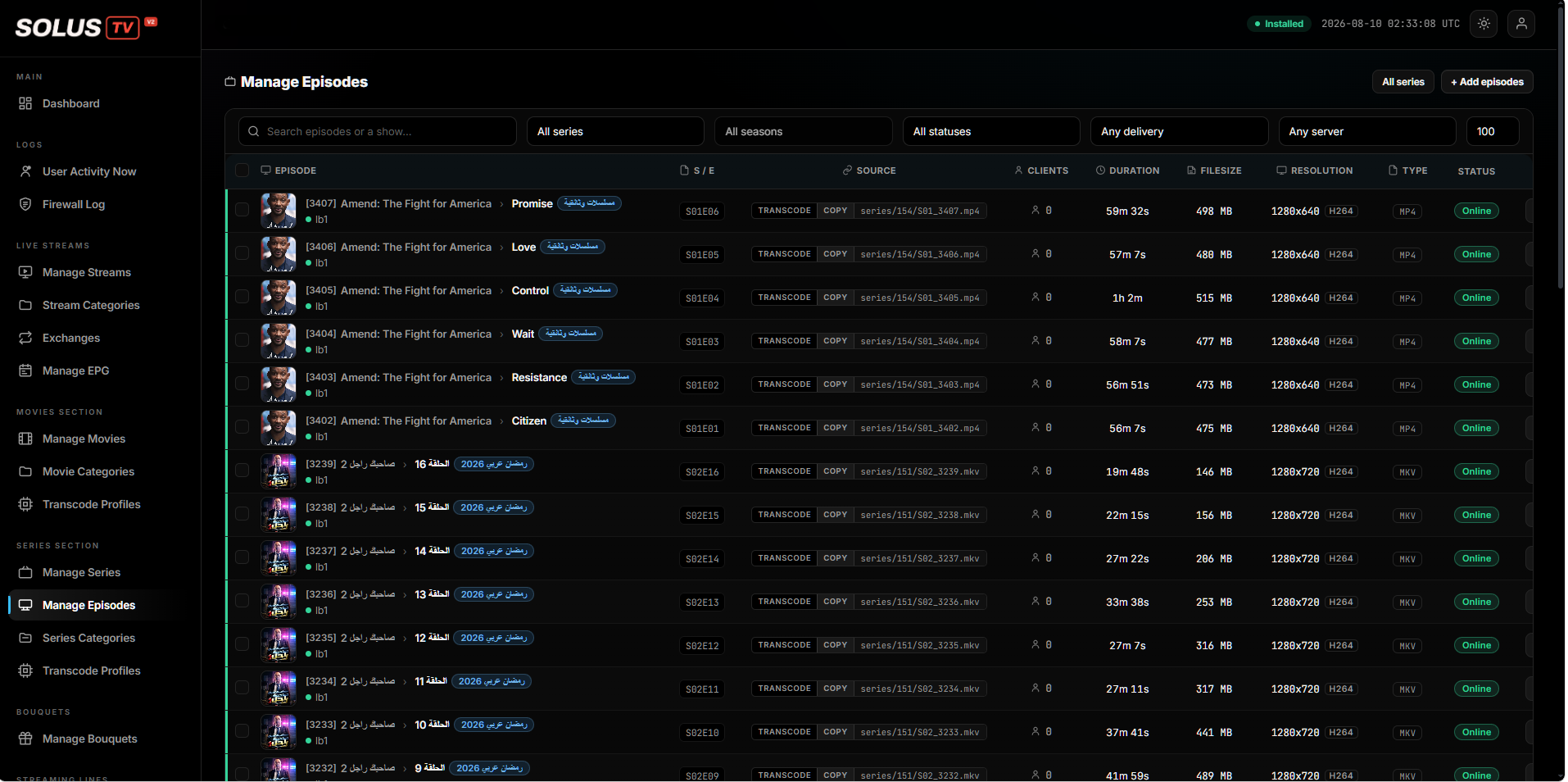
Managing series and episodes, with source, duration, size and status
Series and episodesSeason and episode management, with status per item
Customers and subscriptions

Full control over who watches what, and on how many devices

Every question a subscription business has to answer — what does this customer get, until when, and on how many screens — is a setting on the account rather than an arrangement you have to remember.

  • Create and manage customer accounts from one place.
  • Set how many devices may watch at the same time on one account.
  • Group channels and films into packages, and assign packages per customer.
  • Expiry dates, trials and renewals handled by the platform.
  • Suspend, resume or cancel an account instantly.
  • Restrict an account to particular devices, countries or networks.
  • Search very large customer lists quickly — a list that grows shouldn't get slower to work with.
Customer account active
packages assigned devices at once expiry date country rules network rules activation record

Getting a device connected is a short code rather than a settings screen — see active codes.

Programme guide

A proper TV guide, not just a channel list

A list of channel names asks the customer to already know what they want. A guide showing what's on now and next is the difference between a channel list and something that feels like television.

01 Import

Bring in guide data from multiple sources, rather than being tied to one.

02 Match

Guide data is matched to your channels automatically, instead of by hand.

03 Preview

Check the guide before it goes out, so mistakes are caught by you and not by customers.

04 Publish

Viewers get what's on now and next, on the channels you've published it for.

Catch-up TV

Watch a programme after it has aired

Selected live channels are recorded, so a viewer who missed something can go back to it from the guide rather than being told they're too late.

  • Recorded from the channels you choose, not indiscriminately.
  • Watched from the guide, where the viewer already is.
  • You choose how many days of history to keep, per channel.
Catch-upper channel
selected channels days of history watched from the guide
Monitoring and reporting

Know what's happening, as it happens

The goal is simple: spot a failing channel or an overloaded server before a customer tells you about it. Everything here exists to make that the normal case rather than the lucky one.

live

Who's watching, right now

A live view of who is watching, what they're watching and where from.

per customer

Connection history

Connection history per customer, so a support question has evidence behind it.

per channel

Viewing figures

Per-channel viewing figures — which parts of your line-up are earning their place.

logs

Readable logs

Server and system logs presented in a form you can actually read.

early warning

Before customers complain

A failing channel or an overloaded server shows up in the panel before it shows up in your inbox.

screens

Per-stream detail

Stream-level detail — clients, uptime and picture quality per channel — rather than one number for everything.

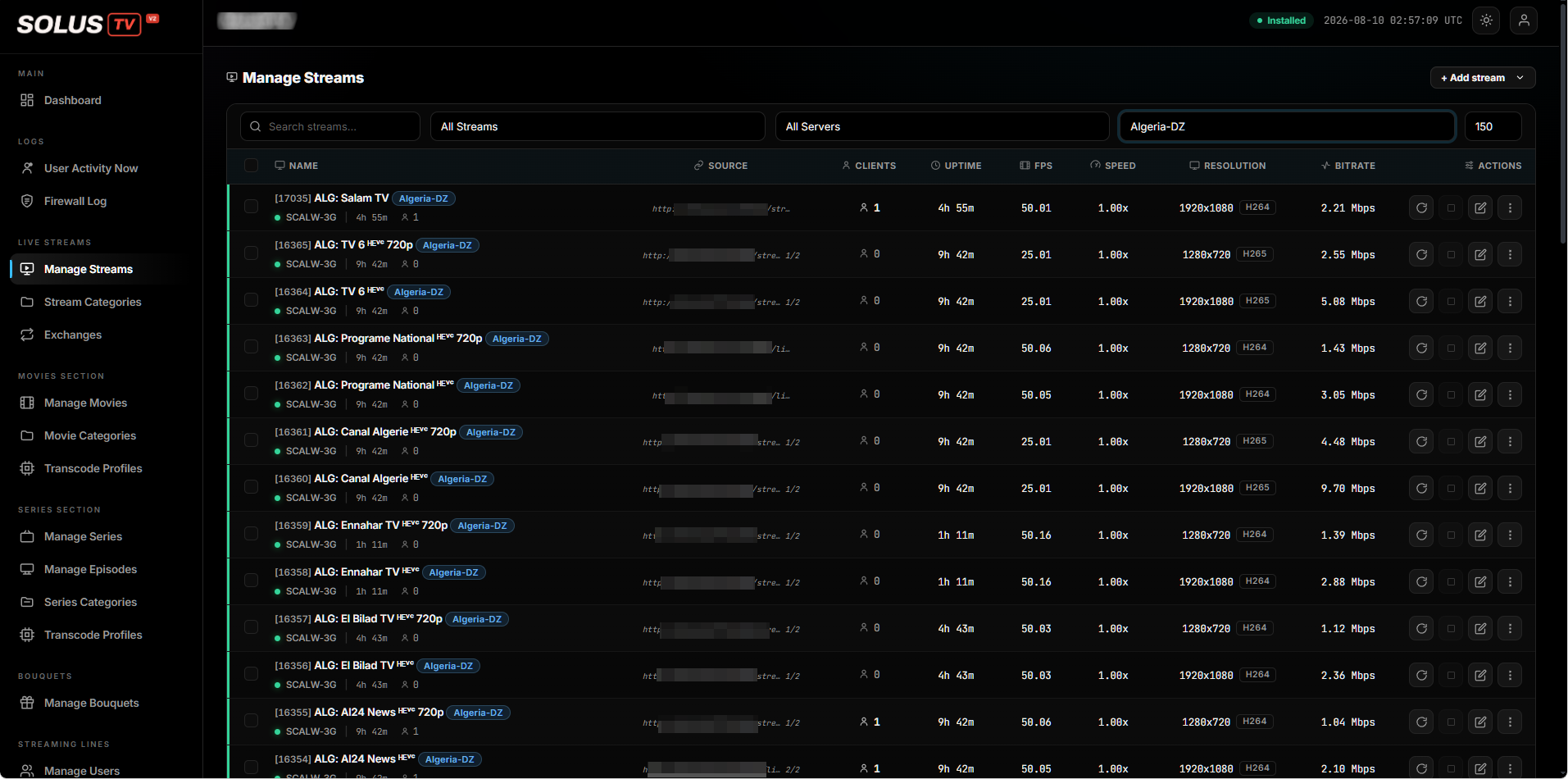
Stream monitoring, showing connected clients, uptime and picture detail per channel
Live streamsConnected clients, uptime and picture detail, per channel
Content delivery

Faster delivery, worldwide

A viewer a long way from your servers has a worse experience than one nearby, and there's a limit to how much hardware fixes that. Connecting a delivery network puts your content closer to them.

  • Connect a Cloudflare account and manage the domains used for delivery from inside the panel.
  • Less load on your own servers, because they aren't serving every request themselves.
  • Better playback for distant viewers, without buying hardware in their region.
Delivery managed in the panel
connected account delivery domains reduced origin load
Developers and migration

Connect it to what you already run

Two things that decide whether a platform fits a business that already exists: whether it talks to your other systems, and whether you can move onto it without starting over.

api

An API for the work you repeat

Automate creating customers, renewing them and managing them — so the routine parts stop being manual ones.

integration

Your billing system and your website

Suited to connecting a billing system or a website to the platform, so a sale on your site becomes an account without anyone retyping it.

documentation

Documented

Documentation is provided, so the integration is a piece of work rather than an investigation.

migration

Move without starting over

Import an existing setup from another platform — channels, films, customers and packages — and run in parallel during the transition rather than switching everything on a single evening.

Maintenance and updates

Stay current without downtime or expertise

Updating the thing your business runs on shouldn't be an evening you set aside and hope goes well. New versions are prepared in advance, so applying one is quick.

  • One-click updates — versions are prepared ahead of time, so applying one is quick rather than a long wait.
  • Automatic backups, so the safety net isn't something you have to remember.
  • Database and maintenance tools built in, rather than assembled from elsewhere.
  • The platform tells you when an update is ready for you.

See how the platform is protected

Update ready
preparedone
applyquick
backupauto
Support in your language

Live chat with the SolusTV team from inside the panel, translated automatically in both directions — see resellers and support.